
Training Module 09 — Settings & Club Configuration
GoClubPro User Training | Area: Settings
What Users Need to Learn
The Settings section is used primarily by Club Admins and Treasurers to configure how the club works. Users need to understand:
- How to update club details (name, logo, motto, location)
- How to configure registration fees
- How to configure match fees by grade
- How to manage season settings per competition
- How to enable or disable feature modules
- How to manage schedule sources
- How payment collection works today (Bank Transfer declare + wallet credit — no card processor)
1. Step-by-Step Walkthrough
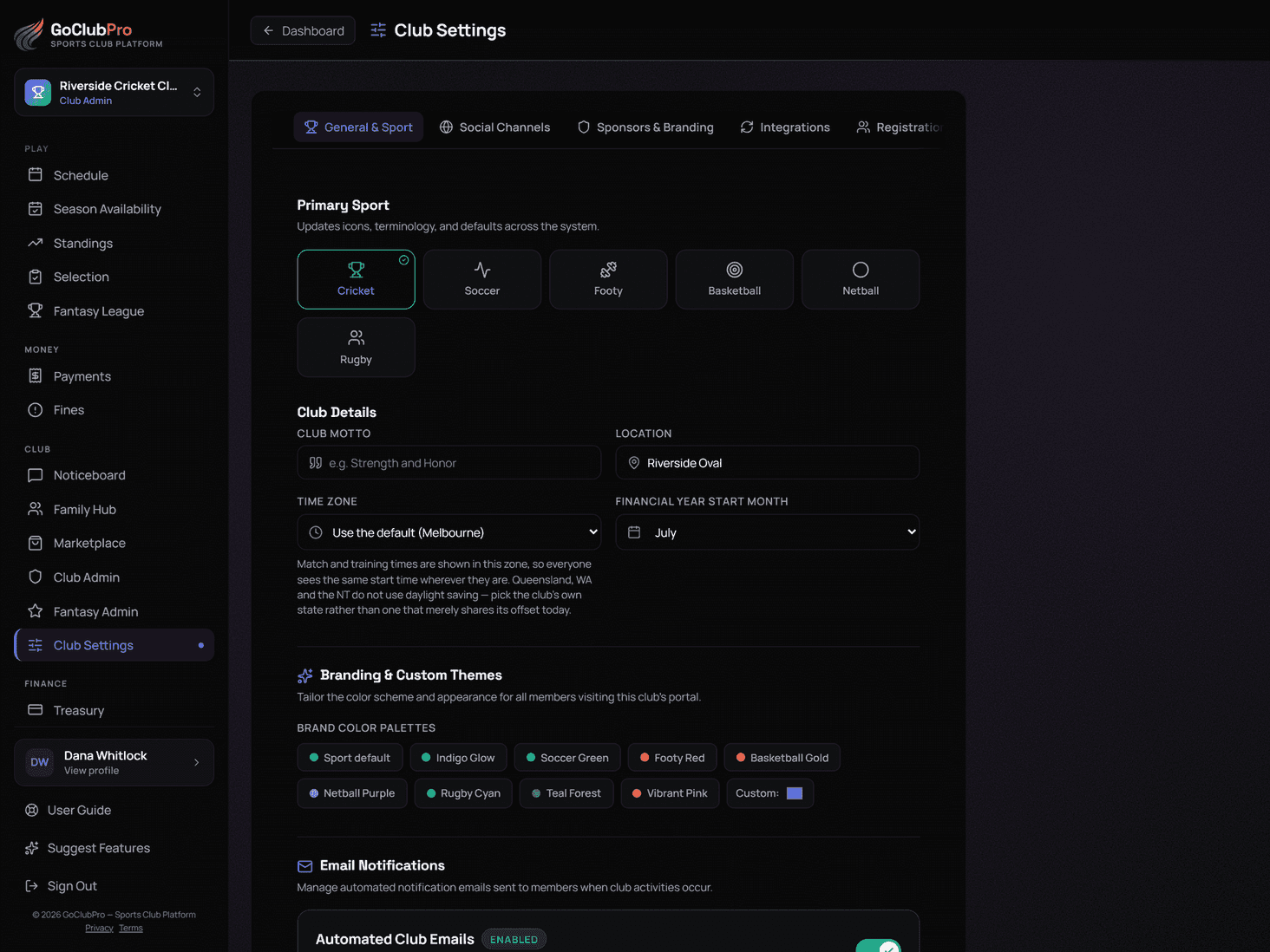
Updating Club Details
- Click Settings in the navigation.
- Under Club Details, click Edit.
- Update:
- Club Name
- Club Logo (upload JPG/PNG, max 5MB)
- Club Motto or tagline
- Physical location / home ground
- Click Save — changes appear on the club Dashboard and navigation immediately.
Setting Registration Fees
- Settings → Fee Configuration → Registration Fees tab.
- You'll see fee tiers by age group (Junior, Senior, etc.) or by category.
- Click Edit next to each tier.
- Enter the fee amount (leave blank if that tier is not charged).
- Optionally add a Season Plan price (bulk fee that covers match fees).
- Click Save for each tier.
- Important: Blank means "fee not set" (not charged), not "$0 — free".
Setting Match Fees by Grade
- Settings → Fee Configuration → Match Fees tab.
- You'll see a row for each grade/team in your club.
- Click Edit next to each grade.
- Enter the per-fixture match fee amount.
- Set a $0 fee if the grade is free to play.
- Click Save for each grade.
- These fees are applied automatically when fixtures are created for that grade.
Enabling or Disabling Feature Modules
- Settings → Features tab.
- You'll see toggles for:
- Fantasy League
- Fines
- Expense Claims
- Noticeboard/Feed
- Toggle each on or off.
- Click Save — disabled modules are hidden from all members immediately.
Managing Schedule Sources
- Settings → Integrations (or Admin Panel → Integrations).
- Under Schedule Sources, you can:
- Add a league platform connection (club ID + season)
- Remove an existing source
- Run a manual sync
- Click Edit on any source to update credentials.
- Click Remove to disconnect a source entirely (existing fixtures remain).
Payment Collection
Clubs collect fees in one of two ways, and can use both:
- Bank transfer or wallet credit. Members declare a transfer (optionally attaching a receipt photo), or spend wallet credit, which is applied to new fees automatically. Your Treasurer verifies both in the Treasurer/Finance interface — see Module 07 — Treasurer & Accounting. This path needs your bank details entered under Treasurer → Payment Setup → Bank & Payments, or members have nowhere to send the money.
- Card payments. Connect a Stripe account under Treasurer → Card Payments. Once it is connected and charges are enabled, members can pay by card and the fee is confirmed automatically rather than waiting on a Treasurer.
A club needs at least one of the two. Payment Setup marks Bank & Payments as required until either bank details are entered or card payments are live, because until then nobody can pay the club at all.
Managing Season Settings
- Admin Panel → Seasons & Competitions.
- Select a season.
- Under Competition Settings, you can adjust:
- Fee override for a specific competition (overrides global fee config)
- Fixture cost display settings
- Season Plan availability toggle
- Click Save per competition.
Early Bird Offers
A separate incentive from ordinary fee configuration — reward members who register before a date with a discount, a freebie, or both.
- Treasurer → Payment Setup → the 4. Early Bird & Extras tab → Early Bird Registration Discount.
- Set a Join by date (leave blank to turn the whole offer off), an optional Discount off the registration fee, and an optional Freebie (free text — jersey, merchandise, anything).
- If you entered a freebie, a fourth field appears — What it costs the club — fill it in if you want the item's cost to post to your accounting ledger when it's handed out (see Module 07 — Treasurer & Accounting).
- Save. It applies automatically to anyone who joins before the cutoff; no code or manual step needed at registration time.

Full setup guidance, including the accounting implications of the cost field, is in the Season Plan Admin Guide.
2. Simple Explanation (Beginners)
Settings is where you configure how your club runs on GoClubPro. Think of it like the control panel for your club:
- Update your club's name and logo
- Set how much players are charged (registration and match fees)
- Turn features on or off
- Members pay fees by declaring a Bank Transfer or using wallet credit — verified by your Treasurer
Most settings are a one-time setup at the start of each season. After that, you only visit Settings when something needs to change.
3. Advanced Explanation (Power Users)
Fee configuration semantics:
- Blank = not configured (fee not charged / shown as "TBD")
- $0 = explicitly free (fee shown as $0.00)
- These are different states — blank allows future configuration without affecting current records; $0 generates $0 fee records.
Competition-level fee overrides:
- The global match fee config (Settings → Match Fees) applies to all grades by default.
- Individual competitions can override this via Admin Panel → Seasons → Competition Settings.
- Override takes precedence over global config for that competition.
Module gating:
- Modules (fantasy, fines, claims, feed) are toggled at the club level.
- When a module is disabled, it's hidden from ALL roles in that club — including admins.
- Disabling does not delete data — re-enabling restores all previous data.
Payment collection architecture:
- Bank Transfer declare + wallet credit, verified by the Treasurer, always works — this is the default and doesn't require any setup.
- Card payments are optional: connect the club's own Stripe account under Treasurer → Card Payments (or Settings → Integrations). GoClubPro never holds a payment processor account on the club's behalf — funds go straight to the club's own Stripe account. See 37 Card Payments.
- Once connected, card payments can be paused instantly with an on/off toggle on that same screen, without disconnecting Stripe.
Schedule source management:
- Multiple schedule sources can be added (e.g., different league platform connections for different competitions).
- Each source is independent — syncing one doesn't affect another.
- Removing a source stops future syncs but does not delete past imported fixtures.
Password change (Personal settings):
- Users can change their own password in their Player Profile → Security tab.
- Admins cannot change other users' passwords — users must use the forgot password flow.
4. Tooltips & Hints
| Location | Tooltip Text |
|---|---|
| Club Logo | Appears on the Dashboard hero and in navigation. Recommended size: 256×256px or larger, square. |
| Blank fee field | Leaving this blank means the fee is not yet configured — no charge is applied. Enter $0 to explicitly mark as free. |
| Season Plan price | Offer this as a cheaper alternative to per-match fees. Must be configured before registration opens. |
| Feature toggles | Disabling a module hides it from all users but doesn't delete data. Re-enable to restore. |
| Bank Transfer / wallet credit | Always available — members pay via Bank Transfer declare or wallet credit, both verified by the Treasurer. |
| Card Payments (Treasurer / Integrations) | Optional per club. Connect Stripe to also accept instant card payments, or pause them anytime without disconnecting. See Module 37. |
| Remove schedule source | Stops future syncs. Existing imported fixtures are not deleted. |
| Competition fee override | Overrides global match fee for a specific competition. Useful for different-rate competitions. |
5. FAQ — Settings
Q: I updated the club logo but it's still showing the old one. A: Clear your browser cache (Ctrl+Shift+R) — logos may be cached. If the issue persists on multiple devices, re-upload the logo.
Q: What happens if I leave a fee field blank? A: Blank means the fee is not configured. Members in that tier won't be charged. Set $0 explicitly if you want to show a $0 fee instead.
Q: Can I have different match fees for juniors and seniors? A: Yes — match fees are configured per grade. Each grade can have its own fee amount.
Q: What does disabling the Fines module do? A: The Fines section disappears from all members' navigation. Existing fines data is preserved — re-enabling restores it.
Q: How do members know which bank account to transfer to? A: Share your club's bank account details directly with members (e.g. via Noticeboard/Feed or your registration materials) — GoClubPro doesn't store or display processor account details. Members enter a reference (and optionally a receipt photo) when they declare a payment, and your Treasurer verifies it against the actual transfer received.
Q: Can members see the fee configuration? A: Members see their individual fees (in Payments) but cannot see the Settings configuration page. Only Treasurers and Club Admins can access Settings.
Q: We set up a Season Plan but players can't see it. A: Check that the Season Plan is enabled in Settings → Fee Config, and that the current season is active in Admin Panel → Seasons.
Q: How do I set up different fees for members who join mid-season? A: This requires a manual fee adjustment by the Treasurer. GoClubPro uses one fee tier per age group per season — mid-season discounts need to be handled on a case-by-case basis in the Treasurer's ledger.
6. Common Mistakes & How to Avoid Them
| Mistake | What Happens | How to Avoid |
|---|---|---|
| Leaving match fee blank when it should be $0 | Fee not generated for fixtures; members not charged at all | Explicitly set $0 for free grades; never rely on "blank = free" |
| Setting fee config after season has started | Match fees for past fixtures aren't retroactively generated | Configure all fees BEFORE importing the schedule or approving registrations |
| Disabling a module without notifying members | Members confused by disappearing features | Announce module changes via Broadcast before toggling |
| Not sharing bank account details clearly | Members transfer to the wrong account or use unclear references | Publish clear bank details and reference format via Noticeboard/Feed |
| Uploading a non-square logo | Logo appears distorted in navigation | Crop logo to square before uploading |
| Forgetting to set Season Plan pricing | Players don't see the bulk payment option | Set Season Plan price alongside registration fee each season |
7. Short Onboarding Script
Settings — Your Club, Your Configuration
Run through these once at the start of each season:
- Club Details — update name, logo, and motto
- Fee Config — set registration fees and match fees by grade
- Features — enable or disable modules for your club
- Payment Collection — make sure members know your bank details and how to declare a payment
Most settings stay the same season to season — just update what's changed.
8. Long Training Guide
Season Setup Checklist
At the start of every season, complete this Settings checklist:
Club Details
- Club name is correct
- Logo is current and properly cropped (square)
- Home ground / location is up to date
Fee Configuration
- Registration fee set for each age tier (or left blank if not applicable)
- Season Plan price configured (if offering bulk payment option)
- Match fee set for each grade (or $0 for free grades)
- Training fee configured (if charging for training)
Features
- Fantasy League — enable if running a fantasy competition
- Fines System — enable if using club discipline features
- Expense Claims — enable if members can submit reimbursement requests
- Noticeboard — enable for club communications
Payment Collection
- Club bank account details are current and shared with members
- Treasurer role is assigned to someone actively verifying declarations
- Wallet credit feature explained to members/guardians who want to top up in advance
Integrations
- league platform connection updated with new season ID
- Schedule sync run after draw is released
Understanding Fee Flow
Settings: Match Fee = $22.50 per game
 ↓ (applied when fixture created)
Fixture record: Team X vs Team Y · $22.50
 ↓ (auto-generated for each player on team)
Player's Payments → Matches tab: Fixture · $22.50 · UNPAID
 ↓ (player pays via Bank Transfer or wallet credit)
Ledger: PAYMENT RECEIVED · $22.50
 ↓ (auto-reconciled from wallet, or manually verified by Treasurer)
Treasurer: Fee marked PAID
If any step in this chain is misconfigured (e.g., blank fee, bank details not shared with members), the chain breaks. Test the full flow with a test fixture and test declaration before opening registrations.
Module Gating in Practice
Use module gating to tailor the experience for your members:
Fantasy League: Enable only if you have a dedicated fantasy league coordinator. The league requires ongoing management (gameweek creation, point scoring). Don't enable it if no one is running it.
Fines System: Best for established clubs with a fines culture. Avoid enabling for youth clubs where fines may not be appropriate.
Expense Claims: Enable when your club has volunteers who regularly incur out-of-pocket expenses. Requires a Treasurer who will actively process claims.
Noticeboard: Nearly always recommended. This is the primary club communication channel. Only disable if your club uses an external tool (e.g., Slack, Facebook Group) exclusively.
9. Micro-Training (Quick Tips)
⚡ QUICK TIPS — Settings

✅ Run through the season setup checklist at the start of every season
✅ Blank fee ≠ free — set $0 explicitly for free grades
✅ Set fees BEFORE importing the schedule
✅ Make sure members know your bank details before opening registrations
✅ Disabling a module hides it but doesn't delete data
✅ Update league platform connection each season with the new season ID
10. Troubleshooting
| Problem | Likely Cause | Fix |
|---|---|---|
| Logo not appearing after upload | Cache or image format issue | Clear browser cache; ensure image is JPG or PNG |
| Members charged wrong amount | Fee config changed after fixtures were created | The old fee is locked to existing records; adjust manually in Treasurer or recreate fixtures |
| Season Plan not visible to players | Not enabled in Fee Config, or wrong season active | Enable Season Plan in Settings; verify active season |
| Member says they don't know where to send payment | Bank details not shared clearly | Publish bank account details and reference format via Noticeboard/Feed |
| Feature module won't save | Browser issue or form validation error | Refresh page and try again; check for any error banners |
| schedule sync failing after settings change | Credentials changed or season ID updated incorrectly | Re-enter League Platform Club ID and season ID in Integrations |
| Fee shows "TBD" to members | Blank fee field | Enter an explicit dollar amount (even $0) for that grade |
| Settings page not visible | Wrong role (not Treasurer or Club Admin) | Contact Club Admin to verify role assignment |
Module 09 of 15+ | Next: Module 10 — Noticeboard & Feed