
Training Module 24 — Multi-Club & Role Switching
GoClubPro User Training | Area: Multi-Club Membership / Context Switching
What Users Need to Learn
Many GoClubPro users belong to more than one club, or hold more than one role. This module covers:
- How to join multiple clubs with one account
- How to switch between clubs seamlessly
- How roles stack across clubs (Coach in one, Player in another)
- How financial data is kept separate per club
- How notifications work across multiple clubs
- Common multi-club user types and their workflows
1. Step-by-Step Walkthrough
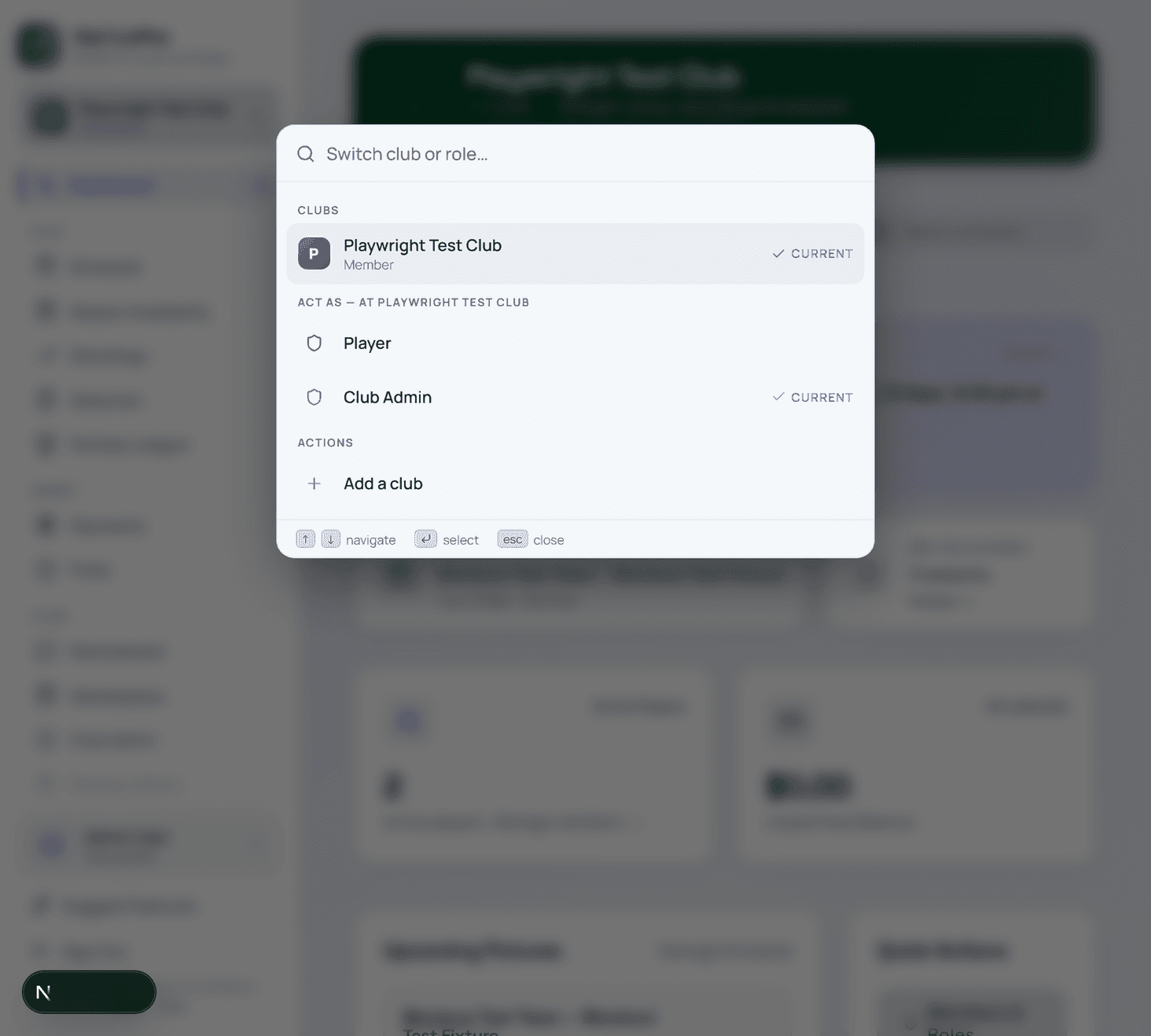
Joining a Second (or Third) Club
- Click the context switcher — the club name chip at the top of the navigation.
- In the switcher panel, click Join Another Club.
- You're taken to the Select Club page.
- Search for the second club and click Request to Join (or use an invite link from that club's admin).
- Once approved, your account is linked to both clubs.
- The context switcher now shows both clubs.
Switching Between Clubs
- Click the club name chip at the top of the page (desktop) or in the mobile drawer under "More".
- The context switcher opens — showing all clubs you're a member of, each with your role in that club.
- Click the club you want to switch to.
- The entire app reloads in the context of that club: new Dashboard, Schedule, Payments — all specific to that club.
- The club chip now shows the new club's name.
Understanding What Changes When You Switch
When you switch club context, the following become club-specific:
- Dashboard data (fixtures, payments, member count)
- Schedule (only that club's fixtures)
- Payments (only that club's fees and history)
- Selection Board (only that club's fixtures and players)
- Treasurer Panel (only that club's finances)
- Admin Panel (only that club's members, settings, seasons)
The following remain the same across all clubs (account-level, not club-level):
- Your profile (name, photo, contact info, MFA)
- Your notification preferences
- Your account security settings
- Your personal data download
Holding Different Roles in Different Clubs
Your role is set independently per club. Common scenarios:
| Club | Role |
|---|---|
| Eastside United FC | Club Admin |
| Northbridge Rovers | Player |
| VMCA District | Association Admin |
Each context shows only the features available for that role:
- In Eastside context: you see Admin Panel, Treasurer, all management features.
- In Northbridge context: you only see Player features (Schedule, Payments, Profile).
- In VMCA context: you see Association-level overview.
Checking Payments Across All Clubs
Payments are club-specific — there's no cross-club "total owed" view unless you're a Parent using Family Hub.
To check payments across clubs:
- Switch to Club A → check Payments.
- Switch to Club B → check Payments.
- Each has its own balance and history.
2. Simple Explanation (Beginners)
One account, multiple clubs — like having one key that opens several different clubrooms, but each room shows its own notice board, schedule, and finance records.
When you switch clubs, you're not logging out and back in. You're just changing which club's "view" you're in. Everything adjusts: the schedule shows that club's fixtures, payments show that club's fees, and your role (and available features) reflects your position in that club.
3. Advanced Explanation (Power Users)
Session context: The active club context is stored client-side and persists between sessions (last-used context is remembered on next login). The context determines which clubId is sent with API requests — all data queries are scoped to the current club.
Role composition per club: Each club membership record has one role. If you need multiple roles in the same club (e.g., Coach AND Treasurer), contact the Club Admin — the platform typically assigns the higher-access role. Multiple roles per club may be supported depending on implementation.
Notification scoping: Notifications are club-scoped. A squad selection notification from Club A only appears when you're in Club A's context (or the notification itself identifies the club). The Alerts tab in each club context shows only that club's alerts.
Financial separation: Payment records, ledger entries, registration fees, and match fees are completely siloed by club. There is no cross-club aggregation at the user level (unless a future admin feature provides this).
your league platform identity: If you import league platform data, your your league platform participant ID is linked to your account globally — it applies across all clubs. Historical stats from your league platform may appear in your profile across multiple club contexts if they're relevant.
Leaving a club: If you leave a club (or an admin removes you), your membership record is removed. Historical payment and fixture data for that club is retained in the club's records (anonymised if you fully delete your account).
4. Tooltips & Hints
| Location | Tooltip Text |
|---|---|
| Club name chip (top) | Click to switch between your clubs. Each club has its own features and role. |
| Join Another Club | Add a second (or third) club to your account. No separate login needed. |
| Role shown in switcher | Your role in each club determines what features you see when you switch to it. |
| Payments (in each club) | Payment records are club-specific. Switch clubs to see fees for each club separately. |
| Alerts tab (per club) | Alerts show only events from the currently selected club. Switch clubs to see other clubs' alerts. |
5. FAQ — Multi-Club & Role Switching
Q: Do I need a separate account for each club? A: No — one account works across unlimited clubs. Use the context switcher to move between them.
Q: My club admin told me to join via an invite. But I'm already in another club. Is that a problem? A: Not at all — accepting a second invite just adds the new club to your existing account.
Q: I'm a Coach at one club and a Player at another. Will I see the Selection Board when I switch to the Player club? A: No — the Selection Board only appears when your role in the current context includes coaching/selecting privileges.
Q: I paid a fee at Club A but it's not showing in Club B's Payments. A: Correct — payments are entirely club-specific. Club A fees and Club B fees never mix.
Q: Can I be a Club Admin at two clubs simultaneously? A: Yes — each club has its own admin structure. Being Admin at Club A doesn't affect your role at Club B.
Q: Can I receive notifications from all my clubs at once? A: Push and email notifications are sent regardless of which club is your active context. In-app Alerts show only the current club's alerts — switch to another club to see its alerts.
Q: How do I remove myself from a club? A: Go to that club's context → Profile → scroll to Club Membership section → Leave Club. Or contact the Club Admin to remove you.
Q: If I leave a club, do I lose my payment history for that club? A: The club retains your payment records in their ledger. Your personal payment history for that club is no longer visible to you after leaving.
6. Common Mistakes & How to Avoid Them
| Mistake | What Happens | How to Avoid |
|---|---|---|
| Paying a fee in the wrong club context | Fee paid to wrong club; refund required | Always check the club chip before navigating to Payments |
| Waiting for a second invite email to create a new account | Duplicate accounts; confusing for admins | Use "Join Another Club" in context switcher for existing users |
| Expecting cross-club payment totals | Missing outstanding fees from another club | Check Payments in each club context separately |
| RSVPing in wrong club context | RSVP submitted to wrong club's fixture | Verify club chip before accessing Schedule |
| Assuming notifications arrive in all contexts | May miss alerts from a non-active club | Set up email + push for critical notifications (delivered regardless of context) |
| Not checking multi-club switcher for a new invite | Assuming the new club isn't there | Open the switcher after accepting any new invite to confirm it appears |
7. Short Onboarding Script
Multiple Clubs? One Account Handles All
Use the context switcher (click your club name at the top) to:
- See all your clubs and your role in each
- Switch clubs with one tap — no re-login needed
- Join a new club via "Join Another Club"
Everything resets when you switch — schedule, payments, and team data are all club-specific.
8. Long Training Guide
Common Multi-Club User Types
The Multi-Sport Athlete: Plays cricket in summer (Club A) and football in winter (Club B). Uses both clubs in the same app — the Schedule, Payments, and Profile adapt to whichever sport is in season.
The Coach/Admin Who Works Across Clubs: Coaches junior and senior teams at different affiliated clubs. Admin role at one, Coach at another. Switches daily during the week.
The Association Admin: Oversees all clubs in a regional association. Has Association Admin role in their VMCA context and possibly a Player or Coach role in their local club. Manages both independently.
The Parent of Multi-Sport Kids: Children play different sports at different clubs. Parent has Player sub-accounts linked to Club A (cricket) and Club B (football). Family Hub aggregates all children across all clubs.
The Treasurer Who's Also a Player: At their home club, holds Treasurer role (access to financials). At a second club, plays as a Player (no financial access). Role gates work independently per club.
Workflow for Coaches Across Multiple Clubs
A coach managing squads across two clubs in the same week:
Monday (Club A):
- Switch to Club A context.
- Check Dashboard for upcoming fixture.
- Selection Board → Squad Builder → confirm squad.
Tuesday (Club B):
- Switch to Club B context.
- Dashboard shows Club B's upcoming fixture.
- Build squad for Club B.
Game day (Club A):
- Switch to Club A.
- Verify squad is confirmed.
- Mark attendance post-game (if admin).
Game day (Club B):
- Switch to Club B.
- Same workflow.
The context switcher makes this seamless — no logging in and out, no confusion about which data you're seeing.
Data Governance Across Clubs
Important to understand: data is siloed by design. If you're a Club Admin at Club A, you cannot see Club B's member data even if you're also a Player at Club B. The separation is absolute.
This protects member privacy across clubs. A person's payment history at Club B is not visible to Club A's administrators — even if the same user is in both clubs.
9. Micro-Training (Quick Tips)
⚡ QUICK TIPS — Multi-Club

✅ One account = unlimited clubs (no separate logins)
✅ Context switcher = the club name chip at the top
✅ Payments are club-specific — check each club separately
✅ Role changes per context — Coach here, Player there
✅ Notifications arrive regardless of active context (push/email)
✅ Check club chip before paying — wrong context = wrong club fee
10. Troubleshooting
| Problem | Likely Cause | Fix |
|---|---|---|
| New club not in context switcher | Invite not yet accepted | Accept the invite email → re-open the switcher |
| Paid wrong club's fee | In wrong context when paying | Contact both clubs' Treasurers to reallocate payment |
| Selection Board missing in second club | Role is Player, not Coach | Contact second club's Admin to update your role |
| Can't find second club's schedule | Still in first club's context | Switch context via the club chip |
| Alerts only from one club | In-app alerts are context-scoped | Switch to the other club to see its alerts |
| Duplicate account created by accident | Signed up with a different email | Contact support to merge accounts; provide both emails |
| Removed from club but still seeing it in switcher | Cache not cleared | Log out and log back in |
Module 24 of 26+ | Next: Module 25 — Schedule Sync Integration Guide